
Are you looking to reach a wider audience with your videos? Translating audio from your videos into different languages can open doors to new viewers and boost your content’s impact.
But how do you do it accurately and efficiently? You’ll discover simple, effective steps to translate audio from video, even if you’re not a language expert. Keep reading, and you’ll learn how to create multilingual content that connects with people around the world—and watch your audience grow like never before.
Credit: www.camb.ai
Preparing Audio For Translation
Preparing audio for translation is a key step in creating multilingual content. Clear, high-quality audio helps translators understand every word. It also ensures the final translation sounds natural and accurate. This process starts with removing the audio from the video. Then, check the sound quality. Last, pick the best file format for easy sharing and editing.
Extracting Audio From Video
First, separate the audio track from your video file. Use software like VLC, Audacity, or online tools. These tools make it simple to extract audio quickly. Save the audio file separately for easier handling. This step helps translators focus only on the spoken words. It also reduces distractions from video visuals.
Ensuring Audio Quality
Good audio quality improves translation accuracy. Remove background noise or echoes using audio editing tools. Check that voices are clear and loud enough. Avoid audio with too many interruptions or unclear speech. Clear sound helps translators catch every word easily. Poor quality can cause mistakes and delays in translation.
Choosing The Right File Format
Pick a common audio format for easy use. MP3 and WAV are widely accepted and work well. WAV files keep better sound quality but are larger. MP3 files are smaller and easier to share. Make sure the format is compatible with translation tools. A good format keeps the process smooth and fast.
Credit: www.harbingergroup.com
Transcription Techniques
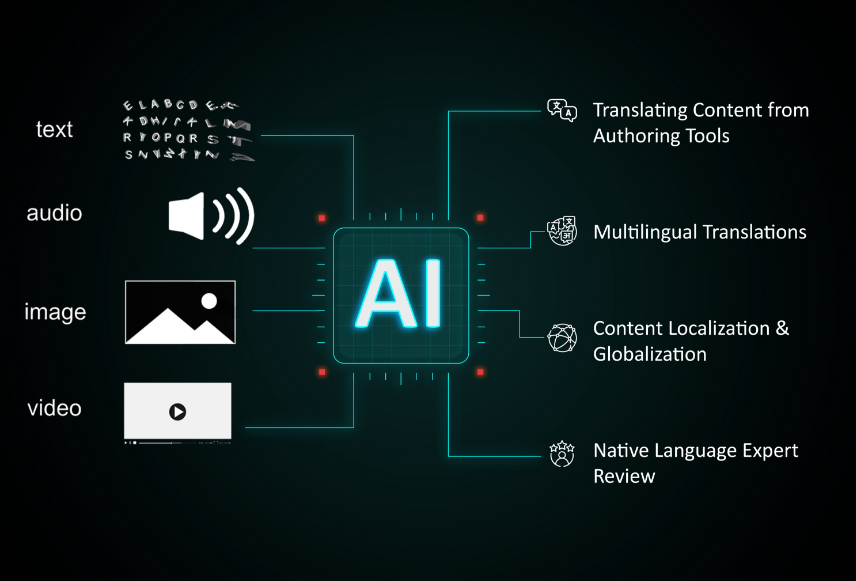
Transcription techniques are essential for translating audio from video. They convert spoken words into text. This text helps create subtitles or scripts in different languages. Accurate transcription improves the quality of multilingual content. It also makes translation easier and faster.
Manual Transcription Methods
Manual transcription means typing what you hear by hand. It takes time but gives high accuracy. You can pause and rewind the audio to catch every word. This method works well for clear speech or small projects. It also helps with difficult accents and background noise.
Using Automated Transcription Tools
Automated tools use software to turn audio into text quickly. They save a lot of time compared to manual typing. Many tools support multiple languages and can handle accents. The accuracy depends on audio quality and the tool’s technology. These tools are great for large files and fast results.
Editing And Verifying Transcripts
After transcription, check the text for mistakes. Correct spelling, grammar, and punctuation errors. Compare the transcript with the audio to ensure accuracy. This step is important for clear translation and subtitles. Well-edited transcripts improve the viewer’s understanding and experience.
Translation Strategies
Choosing the right translation strategy is key for audio translation in videos. The goal is clear, accurate, and culturally fitting content. Different methods work for different projects. Some need human skill, others use fast technology. Understanding the options helps you pick the best path.
Selecting Professional Translators
Professional translators bring experience and accuracy. They understand language and context deeply. They catch subtle meanings and avoid errors. Their work sounds natural to native speakers. This method suits videos with complex topics or sensitive content. It takes more time but improves quality. Trust professionals for the best results.
Utilizing Machine Translation
Machine translation uses software to convert speech quickly. It is fast and cost-effective. Good for simple or large volumes of content. Some tools also sync translation with video timing. Yet, machines can miss nuances or slang. Always review machine output with a human editor. This keeps translations clear and correct.
Handling Cultural Nuances
Cultural differences impact how messages are received. Words or phrases may not translate well directly. Adapting content to local customs is essential. Translators must know the audience’s culture. This avoids confusion or offense. It makes the video feel familiar and relatable. Cultural care improves engagement and trust.

Credit: www.resemble.ai
Synchronizing Translated Audio
Synchronizing translated audio is key to making videos clear and engaging. It means matching new audio with the video’s visuals perfectly. Proper syncing helps viewers understand the message without distraction. Poor synchronization can confuse or annoy the audience. Getting it right improves the flow and keeps viewers watching.
This process involves several challenges and choices. It depends on whether you use voice-over or subtitles. Timing and pacing must be adjusted to fit the new language. Each step requires care for the best result.
Voice-over Vs. Subtitles
Voice-over replaces the original audio with translated speech. It feels natural when done well. Subtitles show translated text at the bottom of the screen. They keep the original audio intact. Voice-over suits videos where hearing the speech matters. Subtitles work better for noisy places or when viewers want original voices. Choosing depends on the audience’s needs and video style.
Lip-syncing Challenges
Lip-syncing means matching the speaker’s mouth movements. It is hard because different languages have different sounds. Some words take longer or shorter to say. Perfect lip-syncing needs careful editing and sometimes re-recording. Many creators accept small mismatches to keep natural speech. The goal is to avoid distracting viewers.
Timing And Pacing Adjustments
Timing means placing audio at the right moment. Pacing is about the speed of speech. Different languages require different timing and pacing. Translators shorten or lengthen phrases to fit the video. Editors may cut or add pauses to keep flow. Good adjustments keep the video smooth and easy to follow.
Tools And Software Recommendations
Translating audio from video requires the right tools and software. These help creators make content in many languages. Using good tools saves time and improves accuracy. It also makes the process easier for beginners.
Below are some useful tools for audio extraction, transcription, translation, and video editing. Each plays a key role in creating multilingual videos.
Audio Extraction Tools
Audio extraction tools separate sound from video files. They create audio files for easier translation. Tools like Audacity and VLC Media Player work well. They support many file formats and are simple to use. These tools help get clean audio without video distractions.
Transcription And Translation Platforms
Transcription platforms convert audio to text quickly. Services like Otter.ai and Sonix offer fast, clear transcripts. For translation, Google Translate and DeepL provide many language options. Some platforms combine both tasks. This saves effort and keeps translations accurate.
Video Editing Software
Video editing software adds translated audio or subtitles to videos. Programs like Adobe Premiere Pro and DaVinci Resolve are popular. They allow easy syncing of audio and video. Some also support subtitle editing. This makes videos ready for viewers in different languages.
Best Practices For Multilingual Content
Creating multilingual content requires care and attention to detail. Following best practices helps deliver clear, engaging messages across languages. It ensures your audience understands and connects with your content. This section covers key steps for successful multilingual audio translation in videos.
Maintaining Consistency Across Languages
Use the same style and tone in all languages. Keep key terms and brand names uniform. Consistent language builds trust and recognition. Avoid slang or regional words that confuse viewers. Create a glossary for translators to follow. This approach helps keep your message clear and professional.
Quality Assurance Processes
Check translations carefully before publishing. Use native speakers to review audio and text. Ensure timing matches the original video speech. Test subtitles or dubbed audio on different devices. Fix errors in grammar, pronunciation, or meaning quickly. High-quality content improves user experience and engagement.
Legal And Copyright Considerations
Get permission for all audio and video materials. Respect copyright rules in every language version. Use licensed tools for translation and editing. Include credits for original creators when required. Avoid legal issues by following local laws. This protects your work and respects others’ rights.
Frequently Asked Questions
How Can I Translate Audio From Video Effectively?
Use specialized software with speech recognition and translation features. Upload your video, extract audio, then translate the text. Verify accuracy with native speakers or AI proofreading tools for quality multilingual content creation.
What Tools Are Best For Video Audio Translation?
Top tools include Google Translate, Kapwing, and VEED. These platforms support automatic transcription, translation, and subtitle generation. Choose based on language support, ease of use, and integration with video editing workflows.
Why Is Audio Translation Important For Content Creators?
Audio translation broadens audience reach by making videos accessible in multiple languages. It improves engagement and SEO by targeting diverse demographics. This boosts your content’s visibility and inclusivity worldwide.
How Do I Ensure Translation Accuracy In Videos?
Use professional translators or AI tools with human review. Cross-check terminology and cultural context. Accurate translations avoid misinterpretations and enhance viewer trust and content credibility.
Conclusion
Translating audio from video helps reach a wider audience. It makes content clear for people who speak different languages. Using simple tools and steps saves time and effort. Always check the translation for accuracy and flow. This way, your message stays strong and easy to understand.
Creating multilingual content grows your reach and impact. Start small, keep improving, and watch your videos connect with more viewers.
