
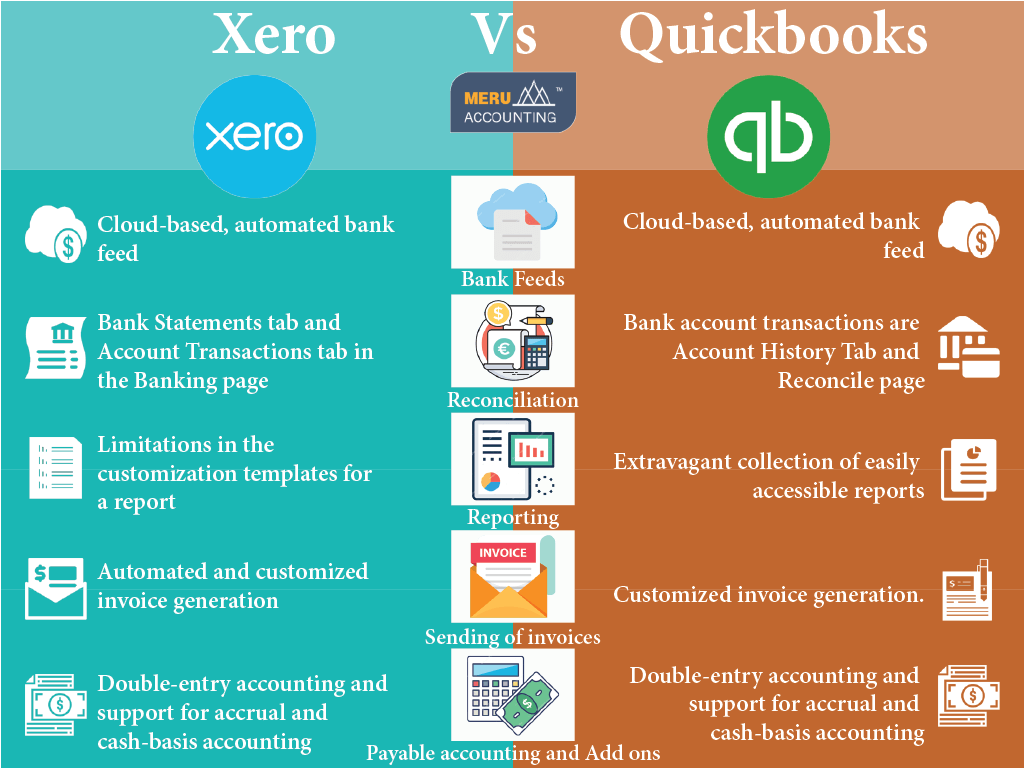
Xero and QuickBooks are two of the most popular accounting software tools available today. Both offer robust features to help businesses manage their finances efficiently.
Choosing the right accounting software can be a game-changer for your business. Xero and QuickBooks each bring unique benefits to the table, making it crucial to understand their differences. This comparison will help you see which one fits your needs better.
Whether you are a small business owner or an accountant, knowing the pros and cons of each platform can save you time and money. Dive into this comparison to discover how Xero and QuickBooks stack up against each other and make an informed decision for your business.
Pricing
When considering accounting software, pricing is a crucial factor. Both Xero and QuickBooks offer various plans to fit different business needs. Understanding the costs involved will help you make an informed decision.
Subscription Plans
Both Xero and QuickBooks offer tiered subscription plans. These plans cater to different types of businesses, from startups to large enterprises.
| Plan | Xero | QuickBooks |
|---|---|---|
| Basic | $12/month | $25/month |
| Standard | $34/month | $50/month |
| Premium | $65/month | $80/month |
Xero offers three plans: Early, Growing, and Established. The Early plan is $12 per month, suitable for small businesses. The Growing plan is $34 per month, ideal for expanding companies. The Established plan is $65 per month, best for larger firms with complex needs.
QuickBooks also has three plans: Simple Start, Essentials, and Plus. The Simple Start plan costs $25 per month, perfect for sole proprietors. The Essentials plan is $50 per month, great for small businesses. The Plus plan is $80 per month, designed for growing companies.
Hidden Costs
Hidden costs can impact your budget. Both Xero and QuickBooks have potential extra charges.
- Xero: Additional users cost $2.50 per month.
- QuickBooks: Additional users cost $10 per month.
For Xero, payroll services are an extra $39 per month. QuickBooks charges $4 per employee per month for payroll services.
Third-party app integrations can also incur costs. Xero and QuickBooks both offer integrations, but some apps require separate subscriptions.
Consider these hidden costs when planning your budget. Ensure you understand all potential expenses before making a decision.
User Interface
Choosing between Xero and QuickBooks can be challenging. Both offer powerful accounting tools. But the user interface plays a crucial role. Let’s explore how each platform’s user interface stacks up.
Ease Of Use
Xero features a clean, modern interface. New users find it intuitive. It guides you through tasks step-by-step. This makes it easy to navigate.
QuickBooks, on the other hand, has a more traditional layout. It can feel overwhelming to beginners. Despite this, many users appreciate its depth. The interface provides quick access to advanced features.
| Feature | Xero | QuickBooks |
|---|---|---|
| Navigation | Simple and guided | Traditional and detailed |
| Beginner Friendliness | High | Moderate |
Customization Options
Xero offers a range of customization options. You can tailor the dashboard to your needs. This includes adding or removing widgets. The customization helps you focus on important metrics.
QuickBooks also allows customization. You can adjust reports, invoices, and the dashboard. The options are extensive. This flexibility suits businesses with specific needs.
- Xero Customization:
- Dashboard widgets
- Reports
- Invoices
- QuickBooks Customization:
- Dashboard layout
- Reports
- Invoices
Both Xero and QuickBooks excel in different areas. Your choice depends on your business needs. Consider ease of use and customization. These factors will influence your experience.
Features
When choosing between Xero and QuickBooks, understanding their features is essential. Both tools offer a range of functionalities to help manage your finances. This section will break down the core and advanced features of each software to help you decide.
Core Features
Xero and QuickBooks both provide essential features for managing business finances. They offer invoicing, expense tracking, and bank reconciliation. Users can easily create and send invoices. Expense tracking allows for easy monitoring of spending. Bank reconciliation helps match transactions with bank statements.
In Xero, users can also manage bills and purchase orders. QuickBooks includes similar capabilities. Both platforms support multiple currencies and basic inventory management. These core features are vital for everyday business operations.
Advanced Features
Advanced features distinguish Xero and QuickBooks. Xero offers robust project management tools. Users can track project time and costs. This feature helps in detailed project analysis.
QuickBooks, on the other hand, excels in payroll management. It provides a comprehensive payroll solution. Users can handle employee salaries, taxes, and deductions. This feature simplifies payroll processing.
Xero includes advanced reporting capabilities. Users can generate detailed financial reports. QuickBooks also offers extensive reporting options. Both tools allow for customization of reports to suit business needs.
Integrations are another key area. Xero integrates with over 800 third-party apps. These include CRM systems and e-commerce platforms. QuickBooks also supports integrations with popular apps. Both tools enhance functionality through these integrations.
Credit: www.chargebee.com
Integrations
When choosing between Xero and QuickBooks, integrations play a crucial role. Both platforms offer robust integration capabilities. These integrations streamline your business processes, saving you time and effort. Let’s delve into how Xero and QuickBooks handle integrations.
Third-party Apps
Both Xero and QuickBooks support a wide range of third-party apps. These apps can enhance your accounting experience.
- Xero integrates with over 800 third-party apps. These include CRM systems, inventory management, and eCommerce platforms.
- QuickBooks also offers extensive app integrations. It supports over 650 third-party apps, covering similar categories.
Both platforms have app marketplaces. Here, you can browse and choose the apps that fit your business needs.
Api Capabilities
API capabilities are essential for custom integrations. Both Xero and QuickBooks offer robust APIs.
- Xero API allows developers to create custom integrations. It supports RESTful API standards and offers comprehensive documentation.
- QuickBooks API also provides a powerful platform for developers. It supports RESTful API and offers detailed guides and resources.
Both APIs enable seamless data exchange. This ensures your systems work together efficiently.
| Feature | Xero | QuickBooks |
|---|---|---|
| Third-Party Apps | 800+ | 650+ |
| API Capabilities | RESTful API, Comprehensive Documentation | RESTful API, Detailed Guides |
In summary, both Xero and QuickBooks offer strong integration capabilities. This helps in enhancing their functionality and meeting your business needs.
Customer Support
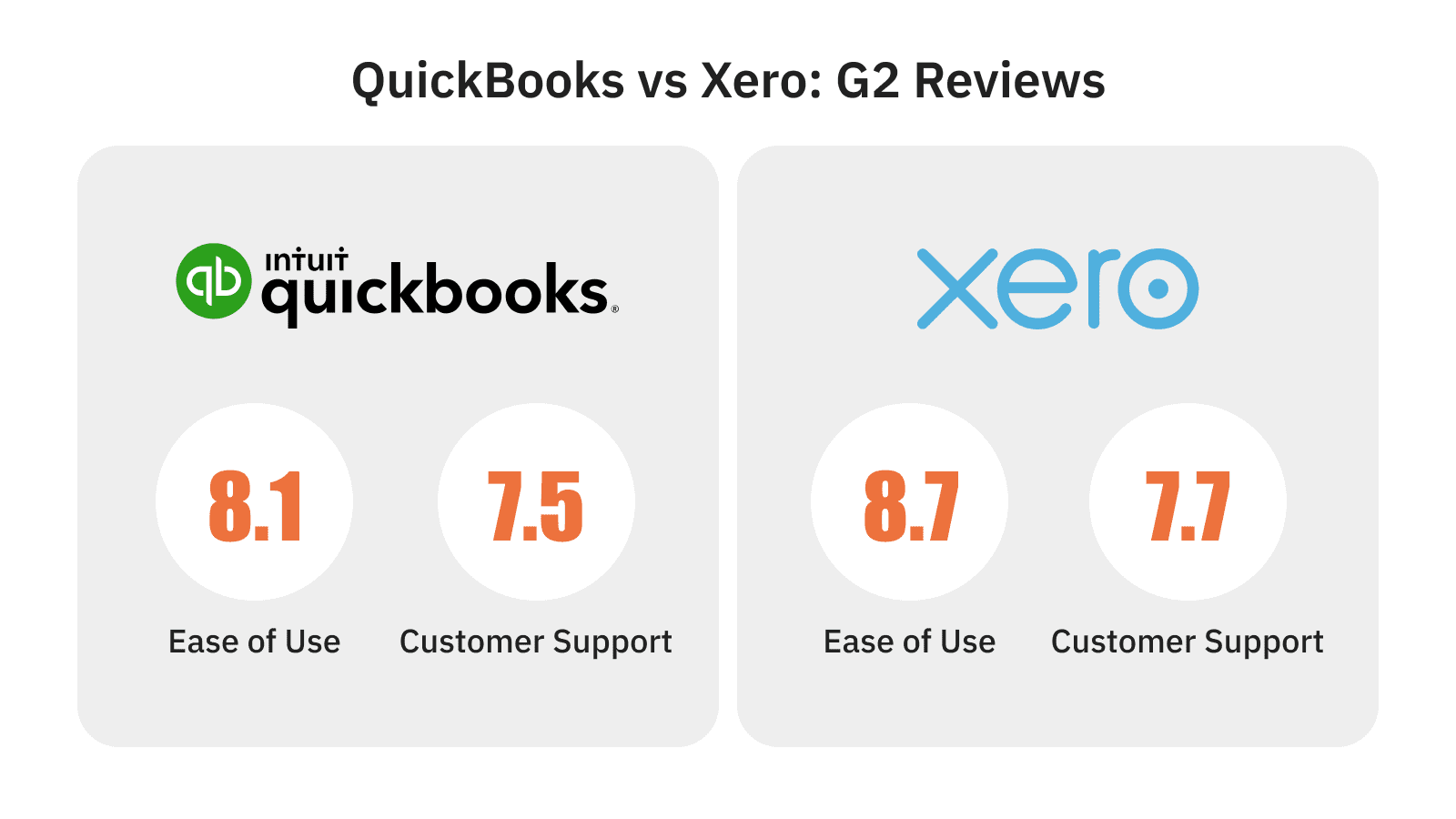
Xero offers 24/7 online support through email and chat, ensuring quick responses. QuickBooks provides phone support and live chat during business hours. Both platforms aim to resolve issues efficiently.
Customer support is a critical factor in choosing between Xero and QuickBooks. Businesses rely on prompt assistance to resolve issues. Let’s dive into the specifics of customer support for both platforms.
Support Channels
Xero offers a variety of support channels. Users can access email support, online help center, and community forums. These resources provide answers to common questions and troubleshooting guides. Xero also has an extensive library of how-to videos.
QuickBooks provides multiple support channels as well. Users can reach out via phone support, live chat, and an online community. QuickBooks also offers a comprehensive knowledge base. This includes tutorials and articles to help users navigate the software.
Response Time
Xero aims to respond to email inquiries within 24 hours. The online help center is available 24/7, offering immediate answers. Community forums also provide quick responses from other users and experts.
QuickBooks offers phone support with a minimal wait time. Live chat responses are typically fast, often within minutes. The online community and knowledge base provide instant access to information.
Understanding the customer support options and response times can help you choose the right accounting software for your needs. Both Xero and QuickBooks provide robust support, ensuring users get the help they need efficiently.
Security
Security is a top priority for any accounting software. Both Xero and QuickBooks offer robust security features. They ensure your financial data stays safe and private. But, how do they compare?
Data Protection
Xero uses multi-factor authentication (MFA). This adds an extra layer of security. You need more than just a password to log in. Xero encrypts your data during transfer and at rest. This means your information is safe even if intercepted.
QuickBooks also offers MFA. It encrypts your data using advanced technology. They employ 128-bit SSL encryption. This is the same level used by banks. QuickBooks ensures your data remains protected both online and offline.
Compliance
Xero complies with major international security standards. They follow GDPR, ensuring data protection for European users. Xero is also ISO/IEC 27001 certified. This means they meet strict information security management standards.
QuickBooks meets various compliance requirements too. They adhere to GDPR and are PCI DSS compliant. This ensures secure handling of credit card information. QuickBooks is also SOC 2 certified, which means they maintain high security and privacy standards.
Both platforms take security seriously. Here is a quick comparison:
| Security Feature | Xero | QuickBooks |
|---|---|---|
| Multi-Factor Authentication | Yes | Yes |
| Data Encryption | During transfer and at rest | 128-bit SSL |
| GDPR Compliance | Yes | Yes |
| ISO/IEC 27001 Certification | Yes | No |
| PCI DSS Compliance | No | Yes |
| SOC 2 Certification | No | Yes |
Both Xero and QuickBooks provide strong security features. They prioritize your data’s safety and comply with important security standards.
User Reviews
When deciding between Xero and QuickBooks, user reviews provide valuable insights. These reviews highlight what users love and what they find frustrating. Below, we break down the positive feedback and common complaints for both platforms.
Positive Feedback
- Users appreciate Xero’s clean and intuitive interface.
- Bank reconciliation is quick and easy.
- Integration with third-party apps is seamless.
- Strong customer support with quick response times.
- Users love the comprehensive reporting features.
- QuickBooks offers a vast array of integrations.
- Mobile app is highly rated for its functionality.
- Long-established software with a strong reputation.
Common Complaints
- Users report occasional syncing issues with bank feeds.
- Some find the inventory management features lacking.
- Limited support for multi-currency transactions.
- Users mention the software can be expensive.
- Occasional complaints about customer service delays.
- Some users find the interface cluttered and overwhelming.
Both Xero and QuickBooks have their strengths and weaknesses. User reviews reveal these insights, helping you make an informed decision.

Credit: pilot.com
Credit: www.chargebee.com
Frequently Asked Questions
What Are The Main Differences Between Xero And Quickbooks?
Xero and QuickBooks differ in user interface, pricing, and features. Xero offers more robust inventory tracking. QuickBooks is known for its comprehensive payroll capabilities. Both are excellent for small businesses but cater to different needs.
Which Is More User-friendly: Xero Or Quickbooks?
QuickBooks is generally more user-friendly for beginners. Its intuitive interface makes it easier to navigate. Xero, while powerful, has a steeper learning curve. Your choice depends on your comfort level with accounting software.
Can Xero And Quickbooks Integrate With Other Apps?
Yes, both Xero and QuickBooks offer extensive app integrations. They can connect with various third-party applications. These integrations help streamline business processes and improve efficiency. Examples include payment gateways, CRM systems, and eCommerce platforms.
Is Xero Or Quickbooks Better For Small Businesses?
Both Xero and QuickBooks are excellent for small businesses. Xero is better for inventory management. QuickBooks excels in payroll and reporting. Your specific needs will determine which is better for your business.
Conclusion
Choosing between Xero and QuickBooks depends on your business needs. Xero offers strong features for growing businesses. QuickBooks is user-friendly and widely known. Both have their strengths and fit different scenarios. Analyze your requirements carefully. Consider your budget and feature preferences.
Test both if possible. The right accounting software will make managing finances easier. Keep your business goals in mind. Make an informed choice and streamline your accounting process.
